


UnGrabber 2.0 WordPress Plugin is a tool that allows you to protect all content from your site from being copied. The plugin completely blocks all existing methods of copying such as the right-click menu, hotkeys, developer’s tools, selection and dragging, and much more.
NOTES
This manual was created for plugins version 2.0.0 and higher. If you use plugins of an older version, use the UnGrabber settings manual for versions 1.0.^.
Installing of the UnGrabber 2.0 WordPress Plugin
To install the plugin, read the article Installing WordPress Plugin. Installing the plugin takes only a few seconds.
To open the plugin settings click Settings below plugin name on the plugins page

, or the plugin settings in the WordPress Sidebar menu go to UnGrabber

In the plugin settings, there are several tabs responsible for various groups of plugin settings.
General Settings
Disable Select All
This setting blocks the selection of all content by hotkeys Ctrl+A (Windows and Linux) / ⌘+A (macOS)
Disable Copy
Protect content from being copied by hotkeys Ctrl+C (Windows and Linux) / ⌘+C (macOS)
Disable Cut
Protect content from being copied by hotkeys Ctrl+X (Windows and Linux) / ⌘+X (macOS)
Disable Paste
Disable Paste hotkeys Ctrl+V (Windows and Linux) / ⌘+V (macOS)
Disable Save
Blocks web page saving by hotkeys Ctrl+S (Windows and Linux) / ⌘+S (macOS)
Disable View Source
Blocks viewing of the page source code by hotkeys Ctrl+U (Windows and Linux) / ⌘+U (macOS)
Disable Print Page
Protects the page from printing by hotkeys Ctrl+P (Windows and Linux) / ⌘+P (macOS)
Disable Developer Tool
Disable to view the source code of the page in browser Developer Tools by hotkeys Ctrl+Shift+I (Windows and Linux) / ⌘+⌘+I (macOS)
Window blur
Hide content if the window has lost focus. It can protect your content from certain types of screenshot tools.
Tab change
Hide content if the tab has lost focus.
Disable Safari Reader Mode
Prevents reading mode from opening in Safari ⌘+Shift+R (macOS)
Disable Right Click
Protect content from being grabbed by right-click menu(Browser Context Menu). When the setting is disabled, the option Right Click on Image appears that can disable mouse right click on image only.
Disable Text Selection
Disable text highlight (text selection) by mouse
Disable Image Dragging
Protects against image theft by dragging
JavaScript Required
Displays JS off message, to protect your website with JavaScript Displays
JavaScript Required Message
Message text displayed when JS is disabled. This message supports HTML markup.
Script Loading
The settings for loading the plugin script and the algorithm for its operation. The plugin uses a unique algorithm to protect the script from being blocked by ad blockers and other extensions.
Static script name
Default mode in which the name of the plugin folder does not change.
Dynamic script name
The method involves dynamically changing the plugin folder, which avoids recognition and blocking it by ad blockers. The following settings are available when the option is enabled:
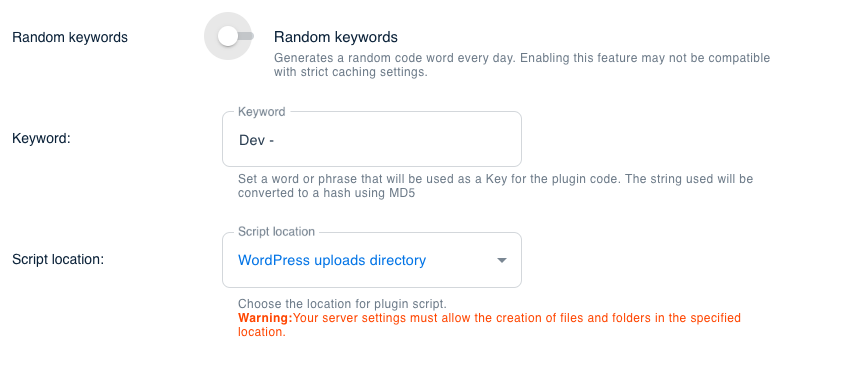
- Keywords – this is a unique string that, using special functions, will be converted into a hash and used as a key for the plugin code. This key allows you to hide the plugin code from ad blockers. For sites with high popularity, we recommend regularly changing the keys to increase the secrecy of the plugin code. To do this, you can enable the Random keywords setting which will automatically create a new keyword every 24 hours. Enabling this feature may not be compatible with strict caching settings.
- Script location – an option allows you to select where the plugin script will be located. You can place the plugin script as a separate file in your uploads, plugins, themes, or in the root directory of your site. However, make sure that the security settings on your site (as well as the settings of other plugins on your site) allow the creation of files in the selected locations.
Save Changes
Do not forget to click Save Changes after changing plugin settings. After clicking this button, the settings will be saved and applied to all pages of the website.
Hosting for UnGrabber 2.0 WordPress Plugin
Fast and reliable hosting is significant for any WordPress site. We recommend all our customers use SiteGround WordPress Hosting. Many unique settings and features make this hosting the number 1 for WordPress: Free Website Transfer, Staging Tools, Free SSL, CDN, and much more for 3.95/mo.